
 AED

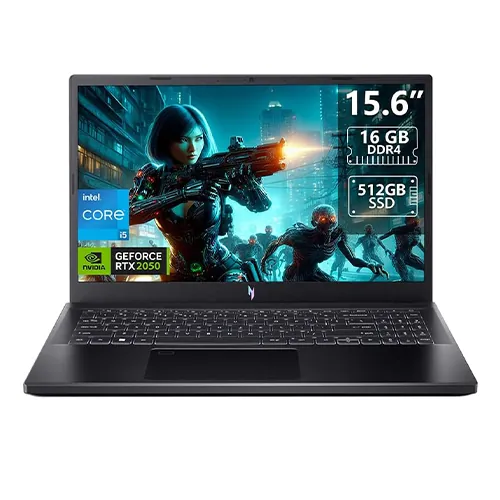
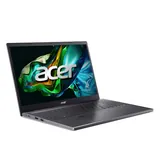
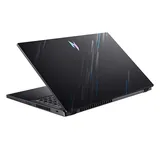
Acer Nitro V 15 15.6-inch Gaming Laptop | Intel Core i5-13420H | 16GB DDR5 RAM | 512GB SSD | NVIDIA RTX 2050 4GB | Windows 11 | Black
AED 3,200.00
Acer Nitro V 15 15.6-inch Gaming Laptop | Intel Core i5-13420H | 16GB DDR5 RAM | 512GB SSD | NVIDIA RTX 2050 4GB | Windows 11 | Black
Buy Acer Nitro V 15 gaming laptop in UAE now! Core i5-13420H, 16GB DDR5, RTX 2050 4GB, 15.6" display. Dubai's entry-level gaming laptop for budget-conscious gamers.
- Brand: Acer
- Screen size: 15.6 Inches
- Colour: Obsidian Black
- Hard disk size: 512 GB
AED: 3200.00
Description
Acer Nitro V 15 Gaming Laptop with 13th Gen Intel Core Processor and NVIDIA GeForce RTX Graphics
The Acer Nitro V 15 is a 15.6-inch gaming laptop designed for PC gaming, everyday productivity, multimedia entertainment, and selected creative applications. The described configuration family combines 13th Generation Intel Core processors, NVIDIA GeForce RTX 40 Series graphics options, DDR5 memory, and PCIe Gen4 SSD storage, providing a hardware platform for users who need gaming capabilities in a portable computer.
With a Full HD display, high-refresh-rate screen options, and Windows 11 configurations, the Acer Nitro V 15 can be considered by students, gamers, content creators, and professionals looking for a laptop that supports both entertainment and routine computing tasks. Actual specifications vary by manufacturer model number.
13th Generation Intel Core Processing Performance
The Acer Nitro V 15 series includes configurations powered by 13th Generation Intel Core processors, designed to handle gaming applications, everyday multitasking, and productivity workloads.
Depending on the installed processor, users can run compatible PC games, office applications, web browsers, video conferencing software, and selected creative tools.
Processor performance depends on the exact Intel Core model, its core configuration, laptop cooling system, power settings, and application requirements.
Before purchasing, confirm whether the selected Acer Nitro V 15 uses an Intel Core i5, Core i7, or another processor configuration.
NVIDIA GeForce RTX 40 Series Laptop Graphics Options
Selected Acer Nitro V 15 configurations feature NVIDIA GeForce RTX 40 Series Laptop GPUs, providing dedicated graphics processing for compatible PC games and GPU-accelerated applications.
Depending on the exact graphics processor, supported technologies may include hardware-accelerated ray tracing and NVIDIA DLSS features in compatible games.
Dedicated graphics can also benefit selected video editing, rendering, and creative applications that support GPU acceleration.
Actual gaming performance depends on the GPU model, graphics memory, configured GPU power limits, processor, cooling system, display resolution, and game settings.
The exact NVIDIA GeForce RTX model and graphics memory capacity should be verified before publishing a specific product listing.
DDR5 Memory for Gaming and Multitasking
The supplied Acer Nitro V 15 series description identifies DDR5 memory, a modern system memory technology used in compatible gaming laptops.
DDR5 memory supports data transfer between the processor and system memory during gaming, application loading, multitasking, and everyday computing.
Available memory capacity and speed vary between Acer Nitro V 15 configurations. Buyers should confirm the installed RAM, memory slot arrangement, and maximum supported capacity using the exact manufacturer SKU.
For users running multiple applications alongside games, sufficient memory capacity is an important consideration when selecting a gaming laptop.
PCIe Gen4 SSD Storage for Games and Applications
The Acer Nitro V 15 description identifies PCIe Gen4 SSD storage, designed to provide fast data access for supported operating system and application workloads.
Solid-state storage can improve system startup, game loading, and file access compared with conventional mechanical hard drives.
PCIe Gen4 technology supports higher potential data transfer speeds than earlier PCIe generations, although actual storage performance depends on the installed SSD model and system configuration.
Confirm the supplied SSD capacity before purchase, particularly if you plan to install multiple modern PC games or store large creative project files.
15.6-Inch Full HD Gaming Display
The Acer Nitro V 15 features a 15.6-inch display with Full HD resolution of 1920 x 1080 pixels in the described configuration family.
This screen format provides a practical balance between visual detail and graphics processing requirements for gaming, video streaming, and general productivity.
The original product information identifies an IPS display, which is associated with wide viewing angles and consistent image appearance.
Panel specifications, including brightness, color coverage, response time, and refresh rate, should be confirmed for the exact Acer Nitro V 15 model.
High Refresh Rate Display Options up to 165Hz
The supplied Acer Nitro V 15 series information identifies display options with refresh rates of up to 165Hz.
A higher refresh rate allows the screen to update more frequently than a conventional 60Hz display, which can improve the perceived smoothness of motion in supported games and applications.
This feature is particularly relevant for competitive gaming, racing games, and other applications involving fast-moving visuals.
However, a 165Hz display does not guarantee that games will run at 165 frames per second. Actual frame rates depend on the installed GPU, processor, game settings, and system performance.
Not every Acer Nitro V 15 configuration necessarily includes a 165Hz panel, so the exact refresh rate must be verified before listing.
Gaming Laptop Cooling and Thermal Management
Cooling performance is an important consideration for laptops combining Intel Core processors and dedicated NVIDIA GeForce RTX graphics.
During gaming, the CPU and GPU can generate substantial heat, making effective ventilation and appropriate power management important for maintaining performance.
Users should keep the laptop's ventilation openings unobstructed and follow Acer's maintenance recommendations.
Actual operating temperatures, fan noise, and sustained gaming performance depend on the exact Nitro V 15 hardware configuration, cooling design, and surrounding environment.
Windows 11 for Gaming and Productivity
The supplied description identifies Windows 11 as the operating system for the Acer Nitro V 15 configuration.
Windows 11 provides compatibility with a wide range of supported PC games, productivity applications, communication software, and multimedia tools.
Users can install compatible gaming platforms, manage documents, browse websites, and run applications required for school or professional work.
The exact Windows 11 edition and activation status should be confirmed using the manufacturer SKU and supplied product configuration.
A Gaming Laptop for Students and Content Creators
The Acer Nitro V 15 is not limited to gaming applications. Its combination of Intel processing, dedicated graphics options, and SSD storage can also support educational and creative workloads.
Students may use the laptop for research, assignments, presentations, and compatible software projects, while content creators can evaluate its GPU and processor specifications for selected editing and rendering applications.
Users planning intensive 3D modeling, professional video production, or other demanding workloads should compare the exact GPU, processor, memory capacity, and display specifications against their software requirements.
Battery Life and Portable Gaming Considerations
The 15.6-inch laptop format allows users to move between home, university, office, and gaming environments without relying on a fixed desktop setup.
Battery runtime varies depending on processor activity, graphics usage, display brightness, wireless connectivity, and the applications running.
Demanding gaming workloads generally consume more power than basic productivity tasks, so users should consider the manufacturer's power adapter and battery specifications when planning extended gaming sessions.
Confirm the exact battery capacity, adapter wattage, and manufacturer-rated runtime for the selected Acer Nitro V 15 model.
Memory, Storage and Connectivity Upgrade Considerations
Before purchasing the Acer Nitro V 15, check the available RAM expansion options, storage slots, and external connectivity features.
Some configurations may support memory or SSD upgrades, but the available options depend on the exact motherboard and product revision.
For gaming accessories, external monitors, and wired networking, verify the available USB connections, display outputs, Ethernet support, and wireless networking specifications.
These details are especially important for buyers planning to use the laptop with an external gaming monitor, headset, keyboard, mouse, or additional storage devices.
Acer Nitro V 15 Gaming Laptop Key Features and Specifications
- Brand: Acer
- Series: Nitro V
- Model Family: Nitro V 15
- Product Type: Gaming Laptop
- Processor Family: 13th Generation Intel Core - As Supplied
- Processor Model: Varies by Configuration
- Graphics Family: NVIDIA GeForce RTX 40 Series Laptop GPU Options
- Graphics Memory: Depends on Exact GPU Model
- Memory Technology: DDR5 - As Supplied
- Installed RAM Capacity: Verify Exact SKU
- Storage Technology: PCIe Gen4 SSD - As Supplied
- Installed SSD Capacity: Verify Exact SKU
- Display Size: 15.6 Inches
- Display Resolution: 1920 x 1080 Full HD - As Supplied
- Advertised Panel Technology: IPS
- Advertised Refresh Rate: Up to 165Hz on Selected Configurations
- Operating System: Windows 11 - Edition Requires Verification
- Memory and Storage Upgrades: Model Dependent
- Connectivity: Verify Exact Port and Wireless Specifications
- Applications: PC Gaming, Education, Productivity and Selected Creative Workloads
Frequently Asked Questions
Q: Is the Acer Nitro V 15 suitable for gaming?
A: Yes. The Nitro V 15 is a gaming laptop series with configurations offering dedicated NVIDIA GeForce RTX graphics. Actual gaming performance depends on the installed GPU, processor, RAM, and game settings.
Q: Does the Acer Nitro V 15 have an NVIDIA RTX graphics card?
A: Selected configurations include NVIDIA GeForce RTX 40 Series Laptop GPUs. Confirm the exact RTX model and graphics memory before purchasing.
Q: Does the Acer Nitro V 15 support a 165Hz display?
A: The supplied series description identifies refresh rates of up to 165Hz on selected configurations. The exact display refresh rate varies by model.
Q: Can the Acer Nitro V 15 be used for video editing?
A: Compatible configurations can support video editing and other creative applications. Performance depends on the processor, graphics card, installed RAM, storage, and software requirements.
Q: Can I upgrade the RAM or SSD in the Acer Nitro V 15?
A: Upgrade options depend on the exact model and motherboard configuration. Verify available memory slots, storage connections, and supported capacities before purchasing upgrade components.
Buy Acer Nitro V 15 Gaming Laptop in UAE
BLUMENiT supplies Acer gaming laptops, gaming desktops, graphics cards, monitors, SSD storage, memory, gaming accessories, and other IT hardware for individual customers, corporate buyers, educational institutions, and wholesale purchasing requirements.
Customers in Dubai, Abu Dhabi, and Sharjah can enquire about Acer Nitro V 15 gaming laptop configurations for PC gaming, educational applications, content creation, and bulk laptop procurement.
For assistance comparing Intel Core processors, NVIDIA GeForce RTX graphics options, RAM capacity, SSD storage, and gaming display specifications, contact the BLUMENiT team.
Visit BLUMENiT Contact Us for product enquiries and wholesale requirements. Final specifications, availability, pricing, warranty coverage, and delivery arrangements are subject to confirmation.
Acer Nitro V 15 Gaming Laptop Smooth Performance for Demanding Everyday Tasks
Struggling with a laptop that slows down right when you need it most during gaming, editing, or multitasking? The Acer Nitro V 15 Gaming Laptop is built to remove that frustration by delivering consistent, responsive performance in real-world use. Powered by a balanced CPU and dedicated graphics setup, it handles modern workloads far more smoothly than older entry-level gaming laptops that often struggle under pressure. Paired with optimized memory performance, it works especially well when configured with Dual Channel Ram, helping reduce lag during switching between apps and gameplay. From competitive gaming sessions to content creation and everyday productivity, it stays stable even when workloads stack up. If you're unsure about tuning your system, you can always reach our expert Aqib for practical advice or quick setup guidance via +971564619807. Q: Is this laptop suitable for both gaming and study or office work? A: Yes, it comfortably handles both thanks to its balanced hardware and efficient thermal design, making it flexible for mixed daily use. Overall, it offers a noticeable step up in responsiveness compared to older budget systems that often bottleneck under load.
Specifications
Specifications:
Warranty Information
Basic Information
Reviews (0)
Related Products
 QUOTE FOR CORPORATE
info@blumenit.com
 B2B
info@blumenit.com
 INCLUSIVE VAT
All prices include VAT