
 AED

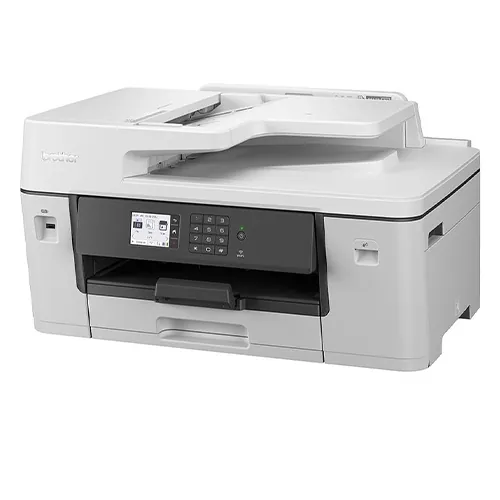
Brother MFC-J3540DW A3 Inkjet Printer, Up to 1200 × 4800 DPI, WiFi Direct / USB 2.0, 2.7" TFT Color Touchscreen LCD, Up to 28/28 IPM Print Speed, Up to 250 Sheets of 80GSM Plain Paper, | MFC-J3540DW
AED 352.00
Description
Brother MFC-J3540DW A3 Colour Inkjet Multifunction Printer with Wi-Fi and Duplex Printing
The Brother MFC-J3540DW is an A3 colour inkjet multifunction printer designed for offices, small businesses, and professional work environments requiring flexible document printing. Combining printing, scanning, copying, and faxing in one machine, it provides a practical solution for handling everyday business documents and larger A3 print jobs.
With wireless connectivity, automatic duplex printing, a 250-sheet paper tray, and a 2.7-inch colour touchscreen, the Brother MFC-J3540DW supports convenient document management for busy workplaces. Its A3 printing capability makes it particularly useful for spreadsheets, business reports, presentations, marketing materials, and other documents requiring a larger paper format.
A3 Printing for Business Documents and Large-Format Output
The Brother MFC-J3540DW supports printing on paper sizes up to A3, giving businesses more flexibility than conventional A4-only printers.
A3 printing is useful for detailed spreadsheets, financial reports, diagrams, presentations, promotional materials, and documents that benefit from additional page space.
For offices working with both standard documents and larger layouts, the ability to print A3 pages reduces the need for a separate large-format document printer.
Colour Inkjet Printing with Up to 1200 x 4800 dpi Resolution
The supplied specifications identify a maximum print resolution of up to 1200 x 4800 dpi, allowing the Brother MFC-J3540DW to produce detailed text, graphics, charts, and colour documents.
Its inkjet printing technology is suitable for everyday office paperwork, presentations, reports, and selected marketing materials.
Actual print quality depends on the selected print settings, paper type, ink condition, and document content. The maximum print resolution should be confirmed against the manufacturer's technical documentation.
Print Speeds of Up to 28 ppm
The Brother MFC-J3540DW is described as supporting print speeds of up to 28 pages per minute for monochrome and colour printing.
Fast document printing can help offices process reports, invoices, forms, and other routine paperwork more efficiently.
Actual printing speed varies according to print quality, paper size, document complexity, and whether the manufacturer's speed rating is measured in ppm or ipm. The supplied 28 ppm specification should be checked against the official test method.
Automatic Duplex Printing to Reduce Paper Usage
Automatic duplex printing allows the Brother MFC-J3540DW to print on both sides of compatible paper without requiring users to turn each sheet manually.
This feature is useful for producing double-sided reports, business documents, educational materials, and internal office paperwork.
Duplex printing can help reduce paper consumption, although supported paper sizes and media types should be verified before selecting a particular print job.
Wireless Printing with Wi-Fi Direct
The Brother MFC-J3540DW supports wireless connectivity, allowing compatible computers and mobile devices to communicate with the printer through a suitable network configuration.
Wi-Fi Direct provides a connection option for supported devices without requiring the same conventional wireless network setup.
Wireless printing is particularly convenient for shared office environments where several employees need access to a common printer. Actual device compatibility depends on operating systems, drivers, network settings, and supported printing services.
USB 2.0 Connectivity for Wired Printing
In addition to wireless connectivity, the printer includes USB 2.0 support for connecting to compatible computers.
A wired USB connection can be useful for individual workstations or office environments where a direct printer connection is preferred.
Confirm the required USB cable type and whether the cable is included in the supplied package.
2.7-Inch Colour Touchscreen for Easy Operation
The Brother MFC-J3540DW features a 2.7-inch TFT colour touchscreen LCD for navigating printer settings and accessing supported device functions.
The touchscreen provides a convenient interface for selecting printing, copying, scanning, and fax-related operations, helping simplify routine document handling.
This can be especially useful in shared offices where multiple employees operate the same multifunction printer.
250-Sheet Paper Tray for Everyday Office Work
The supplied specifications identify a 250-sheet paper tray, allowing the printer to hold a practical quantity of paper for routine office printing.
This capacity can reduce the frequency of paper refilling during regular document printing.
The printer is described as supporting different media types, including plain paper, envelopes, and selected heavier paper. Supported paper weights, sizes, and loading capacities depend on the specific paper feed.
Printing, Scanning, Copying and Faxing in One Device
The Brother MFC-J3540DW combines four common office functions in a single multifunction printer.
- Printing: Produce monochrome and colour documents, including supported A3 print jobs.
- Scanning: Convert compatible paper documents into digital files for storage and sharing.
- Copying: Duplicate business documents, forms, and everyday office paperwork.
- Faxing: Send and receive fax communications when connected to a compatible telephone service.
Combining these functions can help businesses organize document workflows without requiring separate devices for every task.
The maximum supported scan, copy, and fax document sizes should be verified separately. A3 printing capability does not automatically mean every multifunction operation supports A3 originals.
Suitable for Small Offices and Business Workgroups
The Brother MFC-J3540DW is relevant for businesses that need colour printing, occasional A3 documents, wireless access, and multifunction document handling.
It can be considered for administrative departments, accounting offices, educational institutions, professional services, and small business workspaces.
Before selecting the printer for high-volume use, compare the expected monthly printing workload, ink cartridge yield, replacement consumable costs, and recommended print volume.
Brother MFC-J3540DW Key Features and Specifications
- Brand: Brother
- Model: MFC-J3540DW
- Product Type: Multifunction Inkjet Printer
- Printing Technology: Colour Inkjet
- Functions: Print, Scan, Copy and Fax
- Maximum Printing Paper Size: A3
- Maximum Advertised Print Resolution: Up to 1200 x 4800 dpi - Verify Official Specification
- Advertised Print Speed: Up to 28 ppm Mono and Colour - Verify Test Method
- Duplex Printing: Automatic
- Wireless Connectivity: Wi-Fi
- Direct Wireless Printing: Wi-Fi Direct
- USB Connectivity: USB 2.0
- Control Panel: Colour Touchscreen LCD
- Display Size: 2.7 Inches
- Paper Tray Capacity: 250 Sheets
- Supported Media: Plain Paper, Envelopes and Compatible Specialty Media
- Document Handling: Colour Printing, Scanning, Copying and Faxing
- Applications: Small Offices, Business Documents, Reports and A3 Printing
Frequently Asked Questions
Q: Can the Brother MFC-J3540DW print A3 documents?
A: Yes. The Brother MFC-J3540DW supports A3 printing, making it useful for larger spreadsheets, reports, presentations, and business documents.
Q: Does the Brother MFC-J3540DW support wireless printing?
A: Yes. The supplied specifications identify Wi-Fi and Wi-Fi Direct connectivity for compatible devices and network configurations.
Q: Does this Brother printer support automatic double-sided printing?
A: Yes. Automatic duplex printing is supported for compatible paper sizes and media types.
Q: Can the Brother MFC-J3540DW scan and copy documents?
A: Yes. It is a multifunction printer with printing, scanning, copying, and faxing capabilities. Maximum document sizes for each function should be checked separately.
Q: Is the Brother MFC-J3540DW suitable for office use?
A: Yes. Its A3 printing, multifunction features, wireless connectivity, and 250-sheet paper tray make it a practical option for small offices and business workgroups with suitable printing volumes.
Buy Brother MFC-J3540DW A3 Inkjet Printer in UAE
BLUMENiT supplies Brother printers, multifunction office equipment, desktop computers, networking devices, storage products, and other IT hardware for individual buyers, corporate offices, educational institutions, and wholesale customers.
Customers in Dubai, Sharjah, and Abu Dhabi can enquire about the Brother MFC-J3540DW for office document printing, A3 business reports, administrative departments, and bulk printer purchasing requirements.
For assistance checking paper handling, wireless connectivity, ink cartridge compatibility, operating costs, and business purchasing options, contact the BLUMENiT team.
Visit BLUMENiT Contact Us for product information and wholesale enquiries. Final specifications, stock availability, pricing, warranty coverage, and delivery arrangements are subject to confirmation.
Specifications
Specifications:
Warranty Information
Reviews (0)
Related Products
 QUOTE FOR CORPORATE
info@blumenit.com
 B2B
info@blumenit.com
 INCLUSIVE VAT
All prices include VAT