
 AED

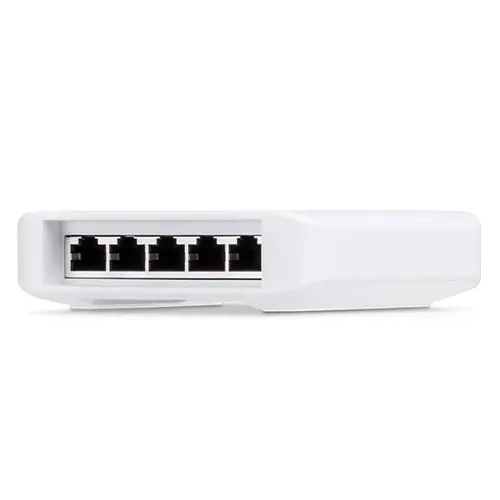
Ubiquiti Networks UniFi Switch Flex 5-Port Managed Gigabit PoE Network Switch, 4 x PoE Ports | 1 x PoE++ Port, Works Indoors and Outdoors,Magnetic Backing, | USW-Flex
AED 495.00
Ubiquiti Networks UniFi Switch Flex 5-Port Managed Gigabit PoE Network Switch, 4 x PoE Ports | 1 x PoE++ Port, Works Indoors and Outdoors,Magnetic Backing, | USW-Flex
The Ubiquiti UniFi Switch Flex. This compact managed switch offers 5 Gigabit PoE ports, including 1 PoE++ port, making it ideal for powering various network devices both indoors and outdoors.
- BRAND: UBIQUITI
- MODEL: USW-FLEX
- DEVICE_TYPE: MANAGED_GIGABIT_POE_SWITCH
- TOTAL_PORTS: 5_GIGABIT
- POE_OUTPUT_PORTS: 4
- POE_INPUT_PORT: 1_POE_PLUS_PLUS
- POE_STANDARD: 802.3AF/AT/BT_VERIFY
- MAX_POE_BUDGET: DEPENDS_ON_POWER_SOURCE
- MANAGEMENT: UNIFI_NETWORK
AED: 495.00
Description
Ubiquiti UniFi Switch Flex USW-Flex 5-Port Gigabit PoE Managed Network Switch
The Ubiquiti UniFi Switch Flex USW-Flex is a compact, managed 5-port Gigabit Ethernet switch designed for flexible network expansion in indoor and suitable outdoor environments. Featuring one PoE input port, four PoE output ports, weather-resistant construction, and UniFi Network management, it provides a convenient networking solution for IP surveillance cameras, wireless access points, and other compatible Ethernet devices.
Its compact enclosure and versatile mounting options make the USW-Flex particularly useful for installations where space is limited or additional network connections are required without installing a larger switch. The device integrates into the UniFi ecosystem for centralized configuration, monitoring, and network administration.
Five Gigabit Ethernet Ports for Network Expansion
The UniFi Switch Flex features five 10/100/1000 Mbps RJ45 Ethernet ports. One port accepts PoE power and provides network connectivity, while the remaining four ports can deliver network connectivity and compatible PoE output to connected devices.
This configuration is suitable for expanding Ethernet connections in offices, surveillance installations, commercial properties, and other environments requiring a compact managed switch.
Four 802.3af PoE Output Ports
The USW-Flex provides four PoE output ports supporting compatible IEEE 802.3af powered devices. These ports can be used to connect suitable IP cameras, wireless networking equipment, and other low-power PoE devices.
The total available PoE output power depends on the power supplied to the switch. Before installation, calculate the combined power requirements of all connected devices to ensure they remain within the supported budget.
Up to 46W Total PoE Output Budget
When powered using a suitable 60W PoE injector and configured according to Ubiquiti's requirements, the UniFi Switch Flex can provide a maximum combined PoE output budget of up to 46W.
Lower-powered PoE input sources provide smaller output budgets. For example, Ubiquiti specifies different available power budgets depending on whether the switch receives 802.3af, 802.3at, or an appropriately configured higher-power input.
The 46W figure represents the combined power available across the four output ports, not 46W per port. Each connected device must also remain within the supported individual port power limit.
Flexible Indoor and Outdoor Installation
The Ubiquiti USW-Flex features a weather-resistant enclosure suitable for supported outdoor installations. Its compact design allows deployment in locations such as building exteriors, sheltered networking areas, security camera installations, and other suitable environments.
Outdoor installations require appropriate cable routing, weather protection, and mounting practices. Check the manufacturer's installation instructions for environmental limitations and recommended accessories.
Wall, Pole and Magnetic Mounting Options
The UniFi Switch Flex offers multiple mounting possibilities, including compatible wall and pole installations. Its magnetic mounting capability also provides flexibility when attaching the switch to suitable metal surfaces.
These installation options make it useful for networking locations where conventional rack-mounted equipment would be impractical.
Centralized Management with UniFi Network
The USW-Flex is managed through the UniFi Network application, allowing administrators to monitor connected devices, configure supported switch settings, and manage compatible UniFi networking equipment from a centralized interface.
Administrators can review port activity, network connectivity, and supported configuration options without managing each compatible device through a completely separate system.
VLAN Configuration and Network Segmentation
UniFi Network management supports VLAN-related configuration options, allowing administrators to organize network traffic according to the requirements of their deployment.
For example, compatible network infrastructure can be configured to separate surveillance equipment, office devices, and other network resources. The available VLAN functions depend on the switch firmware and the broader network configuration.
Port Monitoring and Network Diagnostics
The UniFi Network interface provides visibility into supported switch port information, including connection status, negotiated link speeds, and network activity.
These monitoring capabilities help administrators identify connectivity issues, review connected devices, and maintain network visibility across supported UniFi deployments.
Suitable for IP Cameras and Wireless Access Points
The UniFi Switch Flex is particularly useful for installations involving multiple compatible PoE-powered devices. Its compact size allows it to be positioned closer to equipment such as security cameras and wireless access points, reducing the need for separate local power connections where the PoE budget is sufficient.
Before selecting connected devices, verify their PoE standards, power consumption, and network requirements. Equipment requiring higher-power PoE standards may not be supported by the switch's 802.3af output ports.
Ubiquiti UniFi Switch Flex USW-Flex Key Features and Specifications
- Brand: Ubiquiti
- Series: UniFi Switch
- Model: USW-Flex
- Product Type: Managed Gigabit PoE Network Switch
- Total Ethernet Ports: 5
- Ethernet Interface: 10/100/1000 Mbps RJ45
- PoE Input Ports: 1
- PoE Output Ports: 4
- PoE Output Standard: IEEE 802.3af
- Maximum Combined PoE Output Budget: Up to 46W with Suitable Power Source and Configuration
- Power Input: Compatible PoE Power Sources
- Network Management: UniFi Network
- VLAN Configuration: Supported
- Port Monitoring: Supported
- Installation: Indoor and Suitable Outdoor Environments
- Mounting Options: Wall, Pole and Compatible Magnetic Surfaces
- Applications: IP Surveillance, Wireless Networking and Ethernet Expansion
Frequently Asked Questions
Q: How many Ethernet ports does the Ubiquiti USW-Flex have?
A: The switch includes five Gigabit Ethernet ports. One is used for PoE input and network connectivity, while four support compatible PoE output devices.
Q: Does the UniFi Switch Flex support PoE?
A: Yes. It receives power through PoE and provides four IEEE 802.3af PoE output ports. The total available output power depends on the input power source.
Q: Can the USW-Flex provide 46W of PoE power?
A: Yes, under the supported higher-power input configuration. The 46W rating is the maximum combined output budget across the four PoE output ports.
Q: Can the UniFi Switch Flex be installed outdoors?
A: Yes. Its weather-resistant enclosure supports suitable outdoor deployments when installed according to Ubiquiti's environmental and mounting requirements.
Q: Can I manage the USW-Flex using UniFi Network?
A: Yes. The switch integrates with the UniFi Network application for supported configuration, monitoring, and network administration functions.
Q: Is the USW-Flex suitable for security cameras?
A: Yes. It can power compatible 802.3af IP cameras, provided their individual and combined power requirements remain within the switch's available PoE budget.
Buy Ubiquiti UniFi Switch Flex USW-Flex in UAE
BLUMENiT supplies managed network switches, PoE networking equipment, wireless access points, IP surveillance hardware, and other IT infrastructure products for businesses, system integrators, installers, and wholesale customers.
Customers in Dubai, Abu Dhabi, and Sharjah can enquire about the Ubiquiti UniFi Switch Flex USW-Flex for network expansion, IP camera installations, wireless access point deployments, and bulk networking equipment requirements.
For assistance checking PoE power budgets, network switch compatibility, VLAN requirements, and suitable installation accessories, contact the BLUMENiT team.
Visit BLUMENiT Contact Us for product information and wholesale enquiries. Availability, pricing, warranty coverage, included accessories, and delivery arrangements are subject to confirmation.
Specifications
Specifications:
Warranty Information
Basic Information
Reviews (0)
Related Products

 QUOTE FOR CORPORATE
info@blumenit.com
 B2B
info@blumenit.com
 INCLUSIVE VAT
All prices include VAT