
 AED

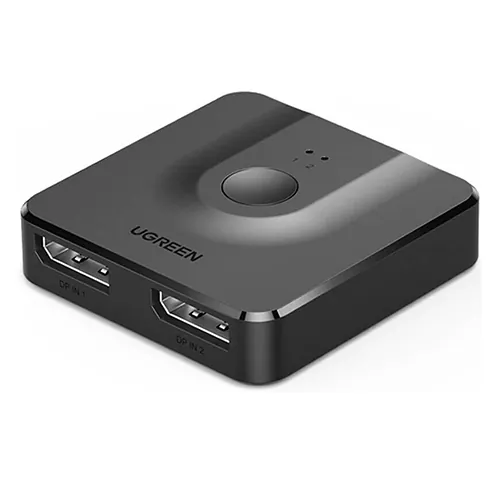
Ugreen CM430 Signal Splitter 2x DisplayPort - input to 1x DisplayPort - output 4K / 1080p Switch, Black | 60622
AED 100.00
Ugreen CM430 Signal Splitter 2x DisplayPort - input to 1x DisplayPort - output 4K / 1080p Switch, Black | 60622
Shop UGREEN CM430 DisplayPort splitter in UAE now! 2 inputs to 1 output, supports 4K and 1080p. Dubai's modern solution for switching between two DisplayPort sources on one monitor.
- Input: 2x DisplayPort
- Output: 1x DisplayPort
- HDCP Compliance: HDCP 2.2 / 1.4
- Supported Resolutions: 4K @ 30Hz (3840 * 2160)
AED: 100.00
Description
UGREEN CM430 DisplayPort Switch 2 In 1 Out - 4K 30Hz
The UGREEN CM430 DisplayPort Switch is designed to connect two DisplayPort-enabled computers to a single compatible DisplayPort monitor. With two DP inputs, one DP output, and a manual switching button, it provides a convenient way to change between video sources without repeatedly disconnecting display cables. This compact DisplayPort switch is suitable for office workstations, desktop computers, home computing setups, and compatible multimedia equipment.
According to the supplied product specifications, the UGREEN CM430 supports video resolutions up to 4K at 30Hz or Full HD 1080p at 60Hz. Its compact black enclosure measures approximately 51 x 51 x 13.5mm, making it suitable for desks where space is limited.
Connect Two DisplayPort Computers to One Monitor
The UGREEN CM430 features a 2 In 1 Out DisplayPort configuration, allowing two compatible video source devices to share one DP display.
For example, users can connect a desktop PC and a workstation to the same DisplayPort monitor, selecting the computer they want to view.
Both devices remain physically connected to the switch, reducing the need to unplug and reconnect DisplayPort cables when changing computers.
Only one source is displayed at a time. The switch does not combine video from both computers or create independent desktop displays.
4K Resolution at 30Hz
The supplied specifications advertise DisplayPort video support up to 4K at 30Hz, making the UGREEN CM430 suitable for compatible high-resolution displays.
4K resolution can provide additional visual detail for documents, spreadsheets, presentations, and other desktop applications.
Users should note that 30Hz is a lower refresh rate than the 60Hz or higher settings commonly preferred for fast-moving games and smoother desktop interaction.
The advertised specification does not establish support for 4K at 60Hz, 4K at 120Hz, or advanced gaming features such as variable refresh rate.
Full HD 1080p at 60Hz
For compatible Full HD monitors, the UGREEN CM430 is advertised as supporting 1920x1080 resolution at 60Hz.
This configuration is suitable for everyday office applications, web browsing, presentations, and general computer use.
Actual resolution and refresh rate depend on the DisplayPort source, monitor capabilities, cable quality, and supported signal formats.
Manual Button for DisplayPort Source Switching
The UGREEN CM430 is described as featuring a dedicated button for selecting the active DisplayPort source.
Users can switch between two connected computers without accessing the rear of the monitor or manually replacing display cables.
This is particularly useful for desks where one monitor is shared between a work computer and a personal desktop.
When changing sources, the monitor may briefly lose and reacquire the video signal while the new DisplayPort connection is established.
Plug-and-Play DisplayPort Connectivity
The supplied product information identifies plug-and-play operation without dedicated software or driver installation.
Connect the DisplayPort outputs from two compatible computers to the switch's input ports, then connect the switch's output to a DisplayPort monitor.
Use the selection button to choose the required computer.
Any external power requirements, included cables, and connection limitations should be confirmed against the manufacturer's documentation for the exact model.
Compact Black Design for Desktop Setups
Measuring approximately 51 x 51 x 13.5mm according to the supplied description, the UGREEN CM430 has a small footprint that fits easily into a workstation arrangement.
Its black exterior complements common desktop computers, monitors, and office accessories.
The compact design is useful for workspaces where users want convenient access to video switching without installing a larger display management device.
DisplayPort Switch vs DisplayPort KVM Switch
The UGREEN CM430 is described as a DisplayPort video switch rather than a complete KVM system.
A DisplayPort switch selects which connected computer sends its video signal to the shared monitor.
A DisplayPort KVM switch typically provides additional USB connections for sharing a keyboard and mouse between computers.
Keyboard and mouse switching is not established in the supplied specifications for the CM430. Users who need to share these peripherals should consider a compatible DisplayPort KVM switch.
Suitable Applications for the UGREEN CM430
- Office Workstations: Switch between two compatible computers connected to one DisplayPort monitor.
- Home Offices: Share a display between separate personal and work computers.
- Desktop PC Setups: Keep two DisplayPort video sources connected without repeatedly changing cables.
- IT Maintenance: Access video output from two compatible computers using one monitor.
- Business Environments: Simplify display connections at shared workstations.
- Multimedia Setups: Select between compatible DisplayPort video sources for everyday viewing.
UGREEN CM430 DisplayPort Switch Key Specifications
- Brand: UGREEN
- Model: CM430
- Product Type: DisplayPort Switch
- DisplayPort Inputs: 2
- DisplayPort Outputs: 1
- Connection Configuration: 2 Inputs to 1 Output
- Maximum Advertised Resolution: 4K at 30Hz
- Full HD Support: 1920x1080 at 60Hz
- Switching Method: Manual Button
- Active Video Sources: 1 at a Time
- Video Interface: DisplayPort
- Driver Installation: Advertised as Not Required
- Dimensions: 51 x 51 x 13.5mm
- Colour: Black
- Connection Type: Wired
- Keyboard and Mouse Switching: Not Advertised
- Independent Extended Desktop: Not Supported
- Recommended Applications: Office Workstations, Home Computing and IT Maintenance
- External Power Requirements: Confirm Manufacturer Specification
- Included Cables: Confirm Retail Package Contents
Frequently Asked Questions
Q: What does the UGREEN CM430 DisplayPort Switch do?
A: It allows two compatible DisplayPort video sources to share one DisplayPort monitor. Users select which source appears on the screen using the manual button.
Q: Does the UGREEN CM430 support 4K at 60Hz?
A: The supplied specifications advertise 4K at 30Hz and 1080p at 60Hz. Support for 4K at 60Hz is not established by the provided information.
Q: Can I connect two computers to one DisplayPort monitor?
A: Yes. The described 2 In 1 Out configuration allows two compatible computers to share one DP monitor, with one source active at a time.
Q: Is the UGREEN CM430 a KVM switch?
A: The supplied description identifies it as a DisplayPort video switch. USB keyboard and mouse sharing is not established.
Q: Can I connect an HDMI gaming console directly?
A: A device with HDMI output cannot connect directly to a DisplayPort input using an ordinary passive cable. A suitable active HDMI-to-DisplayPort converter may be required, subject to compatibility.
Q: Does the UGREEN CM430 require software installation?
A: The product is advertised as plug-and-play without dedicated software installation. Users must still ensure their devices, cables, and monitor are compatible.
Buy UGREEN CM430 DisplayPort Switch in UAE
BLUMENiT supplies DisplayPort switches, KVM switches, HDMI splitters, display adapters, computer cables, monitors, and other IT accessories for individual customers, corporate buyers, and wholesale procurement.
Customers in Dubai, Abu Dhabi, and Sharjah can enquire about the UGREEN CM430 DisplayPort Switch for office workstations, desktop computers, and compatible multi-device display setups.
For assistance checking DisplayPort compatibility, supported resolutions, or selecting a suitable video or KVM switching solution, contact the BLUMENiT team.
Visit BLUMENiT Contact Us for product information and wholesale enquiries. Final specifications, package contents, availability, pricing, warranty coverage, and delivery arrangements are subject to confirmation.
Reliable Dual Display Expansion for High-Performance Workstations in the UAE
Struggling with a single DisplayPort output that can't reliably feed multiple screens without flicker, lag, or resolution loss is a common issue in modern setups. Blumenit - Ugreen CM430 DisplayPort Splitter 2 in 1 out 4K/1080p Black (60622) is designed to eliminate that bottleneck by delivering stable dual-display output from one source. The CM430 splitter handles both 4K and 1080p workflows smoothly, making it suitable for offices, trading desks, and creative environments. Built by Ugreen, it focuses on consistent signal transmission and durable construction that supports long working hours without degradation. Unlike older unmanaged video splitters that often struggle with handshake errors or inconsistent refresh rates, this unit prioritizes reliability and clean switching performance. Q: Does it support plug-and-play setup without drivers? A: Yes, it works directly with compatible DisplayPort devices without requiring additional software, making deployment quick and hassle-free. For users also working with mixed display standards, accessories like Ugreen Hdmi To DVI I Adapter and Ugreen Dvi To HDMI Adapter Cable help bridge legacy monitors efficiently, while the Ugreen Cm430 Displayport Splitter Uae page provides more regional availability details alongside tools like Jvt Computer Store and Sharjah Al Nahda Computers. Priced typically between 120 to 155 AED, this solution also supports wholesale purchasing options, and the Blumenit - Ugreen CM430 DisplayPort Splitter 2 in 1 out 4K/1080p Black (60622) remains a dependable choice for scalable workstation setups.
Specifications
Specifications:
Warranty Information
Basic Information
Reviews (0)
Related Products
 QUOTE FOR CORPORATE
info@blumenit.com
 B2B
info@blumenit.com
 INCLUSIVE VAT
All prices include VAT